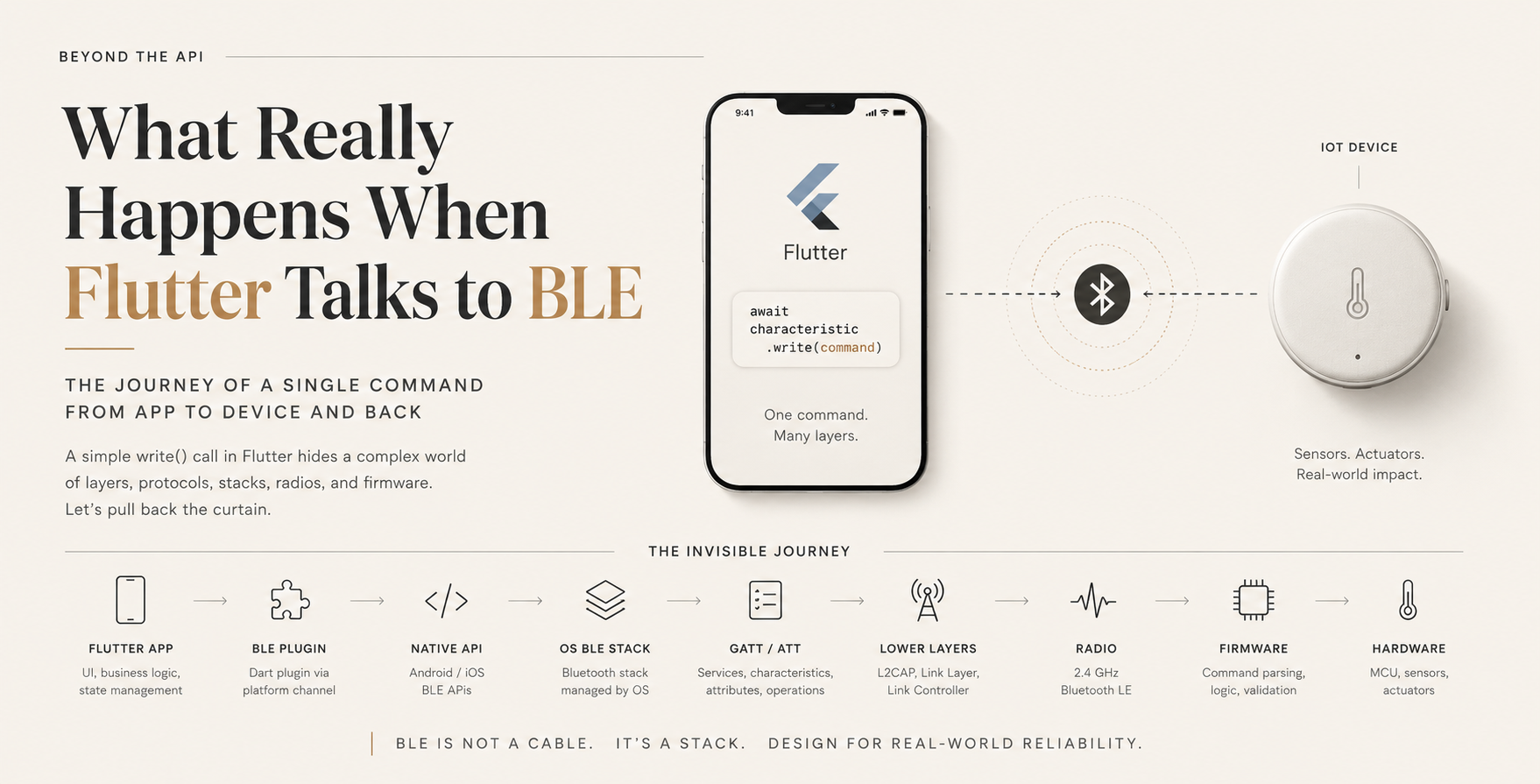
Section 1 — The One Line of Dart That Hides Everything
await characteristic.write(command);
That’s it. One line. An await, a method call, a Uint8List of bytes. It reads like writing to a file or posting to an HTTP endpoint, and that’s exactly the problem: it looks like a simple, synchronous-feeling operation, so it’s tempting to reason about it the same way.
It isn’t the same. Between that line of Dart and the moment an LED turns on inside a physical device sitting on a desk, the command passes through a Dart plugin, a platform channel, a native Bluetooth API, an operating system’s Bluetooth stack, a GATT/ATT session, a link-layer radio protocol, a 2.4 GHz radio transmission, another BLE stack on the receiving device, embedded firmware, and finally a GPIO pin or peripheral driver on a microcontroller.
Every one of those layers has its own rules, its own failure modes, and its own timing behavior — and almost none of that is visible from Dart. This article walks the entire path, in both directions, and explains what each layer is actually responsible for. The goal isn’t trivia. It’s a mental model precise enough that when a write() call hangs, times out, or silently does nothing, you know which layer to suspect.
Section 2 — From Flutter to the Physical Device
At a high level, the path looks like this:
Flutter UI / application code
        │
        ▼
Dart BLE plugin (e.g. flutter_blue_plus, fbp, ble_peripheral, etc.)
        │  (platform channel: MethodChannel / EventChannel / Pigeon)
        ▼
Native platform API
   Android: BluetoothGatt / BluetoothLeScanner (Java/Kotlin)
   iOS:     CoreBluetooth (CBPeripheral / CBCentralManager, Swift/Obj-C)
        │
        ▼
OS Bluetooth stack (Android: Bluetooth stack, e.g. Fluoride/Gabeldorsche;
                     iOS: BTServer / IOBluetooth subsystem)
        │
        ▼
GATT (Generic Attribute Profile) / ATT (Attribute Protocol)
        │
        ▼
L2CAP (Logical Link Control and Adaptation Protocol)
        │
        ▼
Link Layer (connection events, channel hopping, packet framing)
        │
        ▼
Radio (2.4 GHz PHY)
        │
        ▼
IoT device: radio → BLE stack → GATT server → firmware → MCU/peripheral
Flutter, and the plugin sitting under it, control exactly two things: the Dart-level API surface, and how that API is translated into a native call. Everything below the native API — GATT session management, ATT operation sequencing, L2CAP channel handling, link-layer scheduling, radio timing — is owned entirely by the operating system’s Bluetooth stack and, ultimately, the phone’s Bluetooth chipset firmware.
This matters because it means a huge amount of BLE behavior — retry logic, connection parameter negotiation, background scanning restrictions, power management — is not something Flutter or the plugin author can control. They can only request it and observe the outcome.
Section 3 — How the Device Became “Connected”
Before write() can do anything, a sequence of steps already happened, usually well before the write is even attempted:
- Advertising — the IoT device periodically broadcasts advertising packets containing its name, some flags, and often a service UUID, without needing a connection.
- Scanning — the phone’s BLE stack listens for these advertising packets. The Flutter app receives scan results as they surface from the native layer.
- Connection establishment — the app (via the plugin) requests a connection; the native stack performs the link-layer connection procedure with the peripheral.
- GATT service discovery — once connected, the central (phone) queries the peripheral (IoT device) for its GATT service table: which services exist, which characteristics belong to each service, and what properties (read/write/notify/indicate) each characteristic supports.
- Characteristic discovery — specific characteristics are resolved to handles, which is what the plugin actually operates on under the hood, even though Dart code addresses them by UUID.
- Enabling notifications — for characteristics that push data (like a sensor reading), the app writes to the characteristic’s Client Characteristic Configuration Descriptor (CCCD) to ask the device to start sending notifications.
A concrete example: an IoT temperature sensor might expose a custom service (say, UUID 0xFFF0) containing:
- A command characteristic (write-only) — the phone sends control bytes like
SET_LED_ON. - A status characteristic (notify) — the device pushes temperature readings as they change.
None of this is “the BLE protocol” in the sense of Link Layer or L2CAP — GATT is an application-facing data model built on top of ATT, which itself runs over L2CAP. Conflating “services and characteristics” with “the BLE protocol stack” is one of the most common category errors developers make, and it matters later when debugging: a GATT-level problem (wrong UUID, missing property) has nothing to do with a link-layer problem (weak signal, connection interval mismatch).
Section 4 — What Really Happens When Flutter Calls write()
Here’s the same line again, now traced step by step:
await characteristic.write(command);
1. Dart plugin layer. The plugin wraps command (typically a List<int> or Uint8List) along with metadata — which device, which service, which characteristic, and the requested write type (with-response or without-response) — and sends it across a platform channel to native code. This hop is asynchronous by construction; the await in Dart is really waiting on a Future that resolves when the native side reports success or failure.
2. Native API layer.
- On Android, this becomes a call into
BluetoothGatt.writeCharacteristic(...). As of Android 13 (API 33), this call also directly accepts the write type and returns a status code, whereas older Android versions used a callback-based (onCharacteristicWrite) mechanism. Plugins commonly abstract over both to give Flutter one consistent interface. - On iOS, this becomes
CBPeripheral.writeValue(_:for:type:)in CoreBluetooth, with the write type mapped to.withResponseor.withoutResponse.
These are genuinely different codebases with different internal queuing behavior, different error surfaces, and different limits on how many operations can be pending simultaneously. The plugin’s job is to present one Dart API while hiding two different implementations — but it cannot make the two platforms behave identically at every edge case.
3. GATT/ATT operation. The native call is translated into an ATT Write Request (if “with response” was requested) or Write Command (if “without response”). This is the first point where the operation becomes an actual attribute-protocol exchange: the phone’s ATT client sends a PDU (protocol data unit) addressed to the specific attribute handle representing that characteristic’s value.
- A Write Request expects an ATT Write Response back from the peripheral before the operation is considered complete — this is what resolves the Dart
Future. - A Write Command is fire-and-forget at the ATT layer: no application-level confirmation is expected, only (depending on platform) a lower-level acknowledgment that the packet was accepted onto the link.
4. L2CAP. ATT PDUs are carried inside L2CAP packets over a fixed, pre-established L2CAP channel (channel ID 0x0004 for ATT specifically). L2CAP’s job here is largely packaging and, when needed, segmentation of PDUs that exceed a single link-layer payload — it is not concerned with what the bytes mean.
5. Link Layer. The Link Layer schedules the actual over-the-air transmission inside a connection event — a periodic, negotiated time window during which the central and peripheral exchange packets. Link Layer packets have their own header and CRC, are transmitted according to the negotiated connection interval, and are where actual retransmission at the radio protocol level happens if a packet is not acknowledged.
6. Radio. The bytes finally leave the phone as a modulated 2.4 GHz signal on one of the BLE data channels, hopping according to the connection’s channel-selection algorithm.
The crucial point: Flutter and the plugin are responsible for exactly steps 1 and, indirectly, the request in step 2. Everything from GATT/ATT downward is the operating system’s Bluetooth stack acting on the plugin’s request. Flutter never touches L2CAP or the Link Layer directly — it cannot, because those layers aren’t exposed by either native API.
Section 5 — The MTU and Payload Problem
This is where a lot of otherwise careful engineers get something subtly wrong.
The often-repeated claim “BLE has a 20-byte payload limit” is a leftover from the BLE 4.0 default ATT MTU (23 bytes), which after subtracting a 3-byte ATT opcode/handle header leaves 20 bytes of usable attribute payload per single write or notification when no MTU negotiation has occurred. It is not a hard ceiling on BLE as a protocol.
Some precise distinctions:
- ATT MTU — the maximum size, in bytes, of a single ATT PDU that the central and peripheral have agreed to exchange. The default is 23 bytes; both sides can negotiate a larger one (BLE 4.2+ supports MTU negotiation up to 517 bytes in the specification, though real-world ceilings are usually lower and platform-dependent).
- Usable attribute payload — MTU minus protocol overhead (3 bytes for a standard Write Request/Response, more for other operation types). If the negotiated MTU is 185 bytes, the usable payload for a single write is roughly 182 bytes.
- Negotiated MTU — the actual value both sides settled on after an MTU exchange request, which may be smaller than what either side requested, and which is not guaranteed to succeed at all — some peripherals never respond and the connection simply continues at the default MTU.
- Link Layer packet size — a separate, lower-level concept; even with a large ATT MTU, the underlying Link Layer may fragment and reassemble data across multiple radio packets to deliver a single ATT PDU. This fragmentation is invisible to the application and handled entirely by the Link Layer/Controller.
Concretely: suppose the IoT device’s firmware defines a JSON-like command:
{"cmd":"SET_LED","color":"blue","brightness":80,"duration_ms":5000}
That’s roughly 65 bytes as UTF-8 — larger than the default 20-byte usable payload, but comfortably inside a single ATT write if MTU negotiation succeeded at, say, 185 bytes. If MTU negotiation didn’t happen, or the peripheral only supports the default MTU, that same message must be split across multiple writes, and reassembled on the receiving side using an application-level framing scheme (a length prefix, a sequence counter, or a terminator byte) — this is fragmentation/reassembly done by the application or library, not the BLE stack.
This is the core reason Flutter BLE developers need to hold two separate mental objects: the logical application message (the JSON command, in this example) and the individual BLE data transfer(s) that carry the bytes of that message. A library that treats these as the same thing will work fine on payloads under ~20 bytes and mysteriously truncate or corrupt anything larger.
Section 6 — What Happens Inside the IoT Device?
Once the radio signal reaches the peripheral, the same conceptual layers exist in reverse, running on very different hardware — typically a BLE-capable SoC (e.g., Nordic nRF52, ESP32, or similar) running a real-time or bare-metal firmware stack rather than a full OS.
Radio (2.4 GHz PHY, peripheral side)
        │
        ▼
Peripheral's BLE stack (SoftDevice / BLE controller + host stack)
        │
        ▼
GATT server (attribute table, handle-to-value mapping)
        │
        ▼
Characteristic write callback / event handler
        │
        ▼
Firmware application logic (command parsing, validation)
        │
        ▼
MCU (drivers, GPIO, timers, peripherals)
        │
        ▼
Sensor / actuator (physical hardware state change)
Using the earlier example — Flutter sends SET_LED_ON — the device side does roughly this:
- The BLE controller receives the radio packets and reassembles them into an ATT Write Request PDU.
- The GATT server on the peripheral recognizes the attribute handle being written to, and this triggers a firmware event (commonly a callback registered against that handle, e.g., in Zephyr, Nordic’s SoftDevice, or ESP-IDF’s Bluedroid/NimBLE stack).
- Firmware application code reads the raw bytes, validates them (correct length? recognized command opcode? within allowed range?), and only then acts on them.
- If valid, firmware calls into a driver — e.g., toggling a GPIO pin connected to an LED driver, or writing to a PWM peripheral for brightness control.
- If a Write Request (not a Write Command) was used, the stack automatically sends back an ATT Write Response once the write completes, which is what allows the Dart-side
Futureto resolve as successful.
The exact mechanics — which RTOS, which BLE stack, how commands are parsed, whether validation happens before or after acknowledgment — are entirely implementation-specific to that device’s firmware. A Flutter developer integrating with a new device should never assume behavior here; it needs to be verified against that device’s documentation or firmware source.
Section 7 — How the Device Talks Back to Flutter
The return path reverses the journey, but with an important protocol distinction along the way:
Sensor reading changes
        │
        ▼
MCU / firmware detects the change
        │
        ▼
Firmware updates the GATT characteristic's value
        │
        ▼
Notification or Indication sent (if enabled via CCCD)
        │
        ▼
Peripheral's BLE stack → radio
        │
        ▼
Phone's radio → OS Bluetooth stack → GATT/ATT client
        │
        ▼
Native API callback
   Android: BluetoothGattCallback.onCharacteristicChanged
   iOS:     CBPeripheralDelegate.didUpdateValueFor
        │
        ▼
Flutter plugin → Dart Stream/callback
        │
        ▼
Application state update → UI rebuild
Notifications are unacknowledged at the ATT layer — the peripheral sends the value and moves on, with no ATT-level confirmation that the central received it (though the Link Layer beneath it does have its own packet acknowledgment for radio reliability, that’s a different, lower-level guarantee than “the application received and processed this data”).
Indications are the acknowledged counterpart: the central’s ATT layer sends back an explicit confirmation, and the peripheral’s stack won’t send the next indication until that confirmation arrives. This is still an ATT-level acknowledgment, not an application-level one — it confirms the bytes arrived at the ATT client, not that the Flutter application processed them correctly, updated its state, or displayed them.
This is precisely why a notification is not the same thing as a guaranteed, application-acknowledged delivery. If a Flutter app needs to know for certain that a command was received and correctly interpreted by the firmware — not just that some bytes arrived at the Bluetooth stack — the application protocol itself needs to define its own response message, typically as a follow-up write or a separate “ack” characteristic, carrying an explicit sequence number or status code that the firmware sends only after successfully processing the command.
A minimal Dart sketch of that pattern:
final subscription = statusCharacteristic.onValueReceived.listen((data) {
  final ack = CommandAck.fromBytes(data);
  if (ack.sequenceId == pendingCommand.sequenceId && ack.success) {
    pendingCommand.complete();
  }
});

await commandCharacteristic.write(command.toBytes());
await pendingCommand.future.timeout(const Duration(seconds: 3));
The BLE notification transport doesn’t know or care what CommandAck means — that’s an application-level construct layered on top.
Section 8 — Why BLE Is Not a Reliable Pipe
“Connected” is a link-layer/GATT-session concept. It says nothing about whether the application on either end is in a usable state. Several independent factors can break that assumption:
- Latency and connection intervals. The negotiated connection interval (which can range from a few milliseconds to several seconds depending on power/performance tradeoffs) determines how often data can actually be exchanged — a longer interval directly increases perceived latency, independent of anything the application does.
- Radio interference. 2.4 GHz is shared with Wi-Fi and other BLE/Bluetooth Classic devices; packet loss and retransmission at the Link Layer are normal, not exceptional.
- Disconnects. Peripherals reset, go out of range, or enter low-power states; the OS may also silently drop a connection for reasons the app doesn’t observe in real time.
- Stale application state. The Dart-side model of “device is on, LED is blue, temperature is 24°C” can drift out of sync with the device’s actual state after any missed notification, reconnection, or firmware-side reset.
- OS lifecycle and background execution. Both Android and iOS impose restrictions on what a backgrounded app can do with BLE — these are OS policies, not something a plugin can override.
- Device sleep/power management. Many battery-powered IoT devices deliberately reduce BLE activity to save power, which can silently increase latency or delay notification delivery.
- Transient failures. A single write can fail for reasons that have nothing to do with the command itself — a mid-flight disconnection, a GATT operation collision, or a stack-level timeout.
The important conceptual move here: connection state (BLE layer) is not the same as application readiness (your protocol’s state). A robust Flutter BLE integration needs its own explicit application-level state machine — something like disconnected → connecting → discovering services → ready → busy (awaiting ack) → error/reconnecting — layered on top of, but independent from, whatever the native Bluetooth stack reports as “connected.”
Section 9 — Flutter vs Android vs iOS
Flutter’s plugin abstracts API syntax, not underlying OS behavior. Some concrete places where this shows up:
- Permissions. Android requires runtime
BLUETOOTH_SCAN/BLUETOOTH_CONNECTpermissions (Android 12+, API 31+), with different requirements on older versions (ACCESS_FINE_LOCATIONwas historically required for scanning). iOS usesNSBluetoothAlwaysUsageDescriptionand a separate, OS-level Bluetooth authorization prompt. The permission models are not equivalent, and a Flutter plugin can only surface each platform’s own dialog — it can’t unify them into one flow. - Scanning behavior. Android allows more granular control over scan modes and filters; iOS restricts background scanning to service-UUID-filtered scans only, for power and privacy reasons.
- Application lifecycle. iOS is considerably stricter about suspending BLE activity when the app is backgrounded; Android’s behavior varies by OEM and battery-optimization settings, which is itself a well-known source of platform-specific bugs unrelated to Flutter.
- Background execution. iOS supports specific Bluetooth background modes declared in
Info.plist, with real constraints on what operations are permitted; Android’s background limits come from its process/service lifecycle rather than a Bluetooth-specific policy. - Connection handling internals. Android’s
BluetoothGattAPI is notoriously stateful and has known quirks (e.g., needing to close and recreate aBluetoothGattobject after certain failures); CoreBluetooth on iOS has its own, different set of connection-retry conventions.
None of this is a Flutter limitation exactly — it reflects that Flutter sits above two genuinely different native Bluetooth implementations, and the plugin can only paper over syntax, not eliminate the operating systems’ own behavior underneath.
Section 10 — How to Build This Reliably
The naive approach —
await connect();
await write(command);
await disconnect();
— treats BLE like a synchronous, always-succeeding RPC call. It isn’t one. A production-oriented architecture separates concerns explicitly:
Flutter UI
    │
    ▼
Device Repository        (exposes clean domain methods to the UI)
    │
    ▼
BLE Connection Manager    (owns connect/disconnect/retry logic)
    │
    ▼
Device State Machine      (disconnected/ready/busy/error, independent of raw BLE state)
    │
    ▼
Command Queue             (serializes outgoing commands, one in flight at a time)
    │
    ▼
Packet Encoder/Decoder    (application framing: sequence IDs, fragmentation, checksums)
    │
    ▼
BLE transport (GATT/ATT via plugin)
    │
    ▼
IoT Firmware → Command Handler → Hardware
Each piece exists to solve a specific failure mode observed in the earlier sections:
- Connection Manager — centralizes reconnection logic instead of scattering
connect()calls throughout UI code; handles exponential backoff after failures. - State Machine — makes “ready to accept commands” an explicit, application-defined state, distinct from whatever the OS reports as “GATT connected.”
- Command Queue — BLE operations on a single connection are effectively serial; issuing overlapping writes without a queue is a common source of native-layer errors on both platforms.
- Sequence IDs — let the application match a response/ack back to the specific command that triggered it, essential once retries are possible.
- ACKs (application-level) — as established in Section 7, notifications alone don’t confirm the firmware processed a command; an explicit ack message closes that gap.
- Timeouts and retries — every write or read should have an application-defined timeout independent of any OS-level timeout, with a bounded retry policy rather than infinite retries.
- Packet validation — firmware and app should both validate incoming bytes defensively; malformed data over BLE is not rare.
- Reconnection and state synchronization — on reconnect, the app should assume its cached device state is stale until it re-reads or re-subscribes, rather than trusting whatever it last knew.
- Separation between transport and protocol — the BLE plumbing (GATT reads/writes/notifications) should be a thin, replaceable layer underneath an application protocol that doesn’t know or care that BLE is the transport — this is what makes it feasible to later add, say, a Wi-Fi or USB transport without rewriting the command logic.
Closing: Back to One Line
await characteristic.write(command);
The line is simple because everything underneath it is designed to hide complexity — a Dart plugin abstracting a platform channel, a native API abstracting a full Bluetooth stack, a GATT/ATT session abstracting L2CAP and the Link Layer, and a radio abstracting physics. That’s the entire point of layered protocol design: each layer only needs to trust the contract of the layer below it.
But “hidden” is not the same as “gone.” When that write hangs, times out, silently fails, or returns success while the device does nothing, the bug lives in one of these layers — plugin, native API, OS stack, GATT session, radio link, firmware, or hardware — and knowing the full chain is what turns a vague “BLE isn’t working” into a specific, debuggable hypothesis.
Building reliable Flutter-to-IoT BLE applications, in the end, has very little to do with “sending bytes over Bluetooth.” It has everything to do with designing a disciplined application protocol — state machines, queues, sequence IDs, acknowledgments, timeouts — on top of a transport that is asynchronous, OS-mediated, physically constrained, and only ever probabilistically reliable.