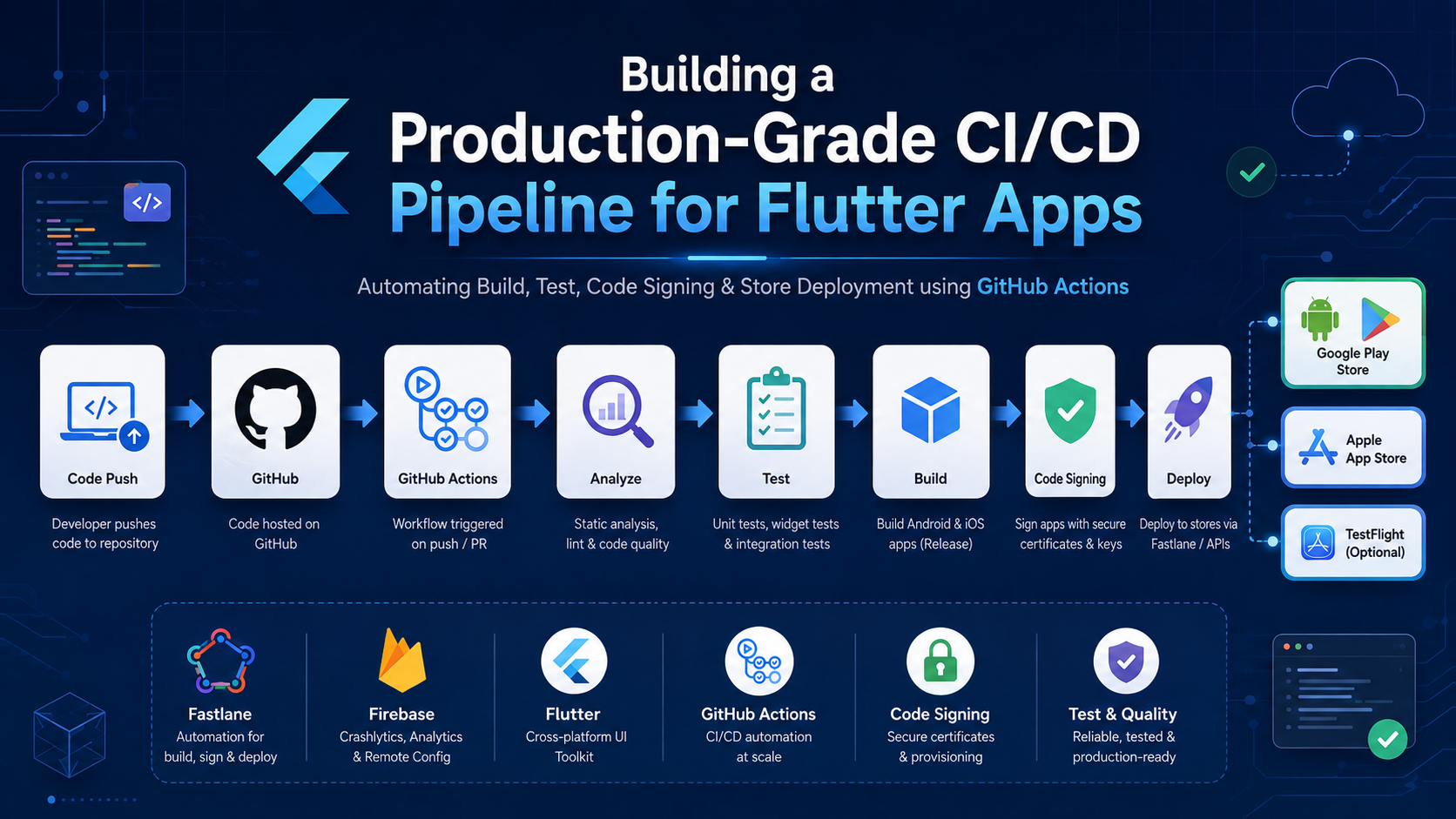
Building a Production-Grade CI/CD Pipeline for Flutter Apps
How to architect GitHub Actions pipelines that automate builds, handle code signing, manage environments, and ship to the App Store and Play Store reliably.
Most Flutter developers have experienced some version of the same problem.
A release is ready. The build works on the developer’s machine. But shipping it requires opening Xcode, finding the right provisioning profile, manually bumping the version, running flutter build for both platforms, then uploading to two different store portals — one step at a time.
That process is slow, error-prone, and impossible to scale across a team.
CI/CD solves this. But setting up a pipeline that reliably builds Flutter apps, handles iOS code signing, manages multiple environments, and deploys to both stores requires more than just running a few shell commands in a YAML file.
In this article, we’ll go beyond the basics and look at how to architect a GitHub Actions pipeline that is robust, secure, and maintainable in real production environments.
Why CI/CD for Flutter Is More Complex Than It Looks
Flutter targets multiple platforms from a single codebase. That is its biggest strength — and the root of most CI/CD complexity. A pipeline that works for one platform often breaks on another.
The challenges that consistently appear in production pipelines include:
|
1
Dual Platform Builds
iOS requires macOS runners. Android can run on Linux. Each has different toolchains, dependencies, and failure modes.
|
2
iOS Code Signing
Certificates, provisioning profiles, and Keychain access must be managed securely without developer machines involved.
|
3
Environment Secrets
API keys, environment configs, and store credentials must be injected securely at build time, not hardcoded.
|
4
Version Management
Build numbers must increment consistently across both platforms and align with store requirements.
|
|
5
Multi-Environment Configs
Dev, staging, and production builds need different API endpoints, keys, and app identifiers.
|
6
Store API Auth
App Store Connect and Google Play both use rotating API credentials that must be managed carefully.
|
7
Long Build Times
Flutter builds, especially iOS, are slow. Caching strategies are essential to keep pipelines practical.
|
8
Runner Drift
GitHub-hosted runners update automatically. Flutter and Xcode version mismatches silently break builds.
|
The core realization: A Flutter CI/CD pipeline is not just a build script. It is a system that coordinates secrets management, platform toolchains, signing infrastructure, and store APIs simultaneously.
Treating it as a simple automation task is what leads to pipelines that work once and break silently afterward.
The Pipeline Architecture
A well-structured Flutter CI/CD pipeline separates concerns across distinct stages. Each stage has a single responsibility, making failures easy to identify and fix independently.
|
Code Push
Branch trigger
PR or tag event |
→ |
Validate
Lint + analyze
Unit tests Format check |
→ |
Sign
Inject certs
Keychain setup Android keystore |
→ |
Build
iOS .ipa
Android .aab Env injection |
→ |
Deploy
TestFlight
Play Internal Production |
|
i
|
Each stage runs as a separate GitHub Actions job. Failures are isolated — a signing failure does not trigger a build attempt, and a build failure never triggers a deployment. |
Managing Environments: Dev, Staging, and Production
One of the most common early mistakes is building a single pipeline that ships directly to production. A proper setup defines clear environment boundaries and controls which branch triggers which environment.
|
Development
✓Branch:
feature/*✓Trigger: every push
✓Runs: lint + tests only
✓No build artifact
✓Fast feedback loop
|
Staging
✓Branch:
develop✓Trigger: merge to develop
✓Full build: iOS + Android
✓Deploy to TestFlight + Internal Track
✓Staging env vars injected
|
Production
✓Trigger: git tag
v*.*.*✓Full build: iOS + Android
✓Deploy to App Store + Play Store
✓Prod env vars injected
✓Manual approval gate
|
Injecting Environment Variables at Build Time
Environment-specific values like API base URLs, feature flags, and analytics keys should never be hardcoded in source. Instead, they are stored as GitHub Actions secrets and injected as Dart defines at build time:
– name: Build iOS (Staging)
run: |
flutter build ipa \
–dart-define=API_URL=${{ secrets.STAGING_API_URL }} \
–dart-define=ENV=staging \
–dart-define=APP_KEY=${{ secrets.STAGING_APP_KEY }}
Inside the Flutter app, these values are accessed via const String.fromEnvironment('API_URL') — available at compile time with zero runtime overhead and never exposed in source control.
Code Signing and Certificates
Code signing is the most fragile part of any Flutter CI/CD pipeline. It requires the right certificates, provisioning profiles, and keychain configuration — all applied in the correct order, on the correct runner.
|
iOS Signing
→Export
.p12 certificate from Keychain Access→Base64-encode it and store as GitHub Secret
→Download provisioning profile from Apple Developer Portal
→Base64-encode profile and store as GitHub Secret
→Decode and install both in CI pipeline before building
→Create a temporary Keychain so credentials don’t persist between runs
|
Android Signing
✓Generate keystore using
keytool✓Base64-encode keystore and store as GitHub Secret
✓Store alias, key password, and store password as separate secrets
✓Decode keystore file during pipeline run
✓Reference via
key.properties in Gradle✓Build signed
.aab with flutter build appbundle --release |
iOS Signing in GitHub Actions
The iOS signing setup in your workflow file follows a predictable sequence: create a temporary keychain, import the certificate, install the provisioning profile, then clean up after the build completes.
– name: Install iOS Certificate
run: |
echo “${{ secrets.IOS_CERT_BASE64 }}” | base64 –decode > cert.p12
security create-keychain -p “” build.keychain
security import cert.p12 -k build.keychain \
-P “${{ secrets.IOS_CERT_PASSWORD }}” -T /usr/bin/codesign
security list-keychains -s build.keychain
security default-keychain -s build.keychain
security unlock-keychain -p “” build.keychain# Install provisioning profile
– name: Install Provisioning Profile
run: |
echo “${{ secrets.IOS_PROFILE_BASE64 }}” | base64 –decode > profile.mobileprovision
mkdir -p ~/Library/MobileDevice/Provisioning\ Profiles
cp profile.mobileprovision \
~/Library/MobileDevice/Provisioning\ Profiles/
Android Keystore via key.properties
Android signing is configured through a key.properties file that Gradle reads at build time. This file is never committed to source — it is generated dynamically in the pipeline:
– name: Setup Android Signing
run: |
echo “${{ secrets.ANDROID_KEYSTORE_BASE64 }}” \
| base64 –decode > android/app/keystore.jks
cat > android/key.properties << EOF
storePassword=${{ secrets.KEYSTORE_STORE_PASSWORD }}
keyPassword=${{ secrets.KEYSTORE_KEY_PASSWORD }}
keyAlias=${{ secrets.KEYSTORE_KEY_ALIAS }}
storeFile=keystore.jks
EOF
Build Automation: iOS and Android
iOS and Android builds run as parallel jobs in separate GitHub Actions workflows. Parallelizing them cuts total pipeline time nearly in half compared to running them sequentially.
|
iOS Build Job
1Runner:
macos-latest2Setup Flutter (pinned version)
3Cache pub dependencies
4Install certificate + provisioning profile
5Run
flutter build ipa --release6Upload
.ipa as workflow artifact |
Android Build Job
1Runner:
ubuntu-latest2Setup Flutter (pinned version)
3Cache pub + Gradle dependencies
4Decode keystore + write key.properties
5Run
flutter build appbundle --release6Upload
.aab as workflow artifact |
Always Pin Your Flutter Version
Using flutter-version: stable in your workflow will silently break your pipeline whenever Flutter ships a new release. Always pin to an explicit version and update it deliberately:
with:
flutter-version: ‘3.19.6’ # Always pin explicitly
channel: ‘stable’
Caching Dependencies to Speed Up Builds
Pub package downloads and Gradle caches account for a significant portion of Flutter build times. Caching these between runs can reduce pipeline duration by several minutes:
– uses: actions/cache@v3
with:
path: ~/.pub-cache
key: ${{ runner.os }}-pub-${{ hashFiles(‘pubspec.lock’) }}# Cache Gradle (Android only)
– uses: actions/cache@v3
with:
path: |
~/.gradle/caches
~/.gradle/wrapper
key: ${{ runner.os }}-gradle-${{ hashFiles(‘**/*.gradle*’) }}
App Store Deployment
Deployment runs as a final job that depends on successful completion of both build jobs. Artifacts are downloaded from the previous jobs and uploaded to their respective stores using API credentials — no manual portal access needed.
|
App Store Connect (iOS)
→Generate API Key in App Store Connect
→Store Issuer ID, Key ID, and
.p8 file as secrets→Upload
.ipa using xcrun altool or xcrun notarytool→Staging deploys to TestFlight beta group
→Production submits to App Store review
|
Google Play (Android)
✓Create Service Account in Google Cloud
✓Grant it release manager permissions in Play Console
✓Store service account JSON as GitHub Secret
✓Use
r0adkll/upload-google-play action✓Staging targets internal testing track
✓Production targets production track
|
Google Play Upload Step
uses: r0adkll/upload-google-play@v1
with:
serviceAccountJsonPlainText: ${{ secrets.PLAY_SERVICE_ACCOUNT_JSON }}
packageName: com.yourcompany.yourapp
releaseFiles: build/app/outputs/bundle/release/*.aab
track: internal # or ‘production’
status: completed
Common Mistakes We Often See
Most CI/CD pipelines that fail in production do so because of a handful of avoidable early decisions. The mistakes are consistent enough across teams that they are worth calling out directly.
|
!
Not Pinning Flutter Version
Using
stable silently breaks builds when Flutter releases an update with breaking changes. |
!
Committing Secrets
API keys,
GoogleService-Info.plist, and keystore files should never be in version control. |
!
Single Pipeline for All Environments
Without separate staging and production jobs, one bad commit can deploy broken code directly to users.
|
|
!
No Caching Strategy
Downloading pub packages and Gradle dependencies on every run makes pipelines unnecessarily slow and expensive.
|
!
Permanent Keychain Entries
Not using a temporary Keychain for iOS signing leaves certificates on the runner, causing failures on subsequent builds.
|
!
No Manual Approval Gate
Production deployments should require a human approval step via GitHub Environments — never auto-deploy to production.
|
What a Mature Pipeline Looks Like
As pipelines mature, teams typically layer in additional capabilities that go beyond basic build and deploy automation:
|
Automated version bumping
|
PR build previews
|
Slack / Teams notifications
|
|
Automated release notes
|
Screenshot automation
|
Integration test runs on device farms
|
Final Thoughts
Getting a Flutter app to build locally is straightforward. Getting it to build, sign, and ship automatically — across two platforms, three environments, and a team of developers — is an engineering problem in its own right.
The teams that maintain reliable pipelines share a common approach: they treat the CI/CD system as a first-class part of their codebase, version-controlled and reviewed with the same discipline as application code.
Secrets are never committed. Versions are always pinned. Environments are always separate. Builds are always cached. Deployments always require intent.
Done right, a CI/CD pipeline transforms releasing a Flutter app from a stressful manual event into something so routine it barely registers.