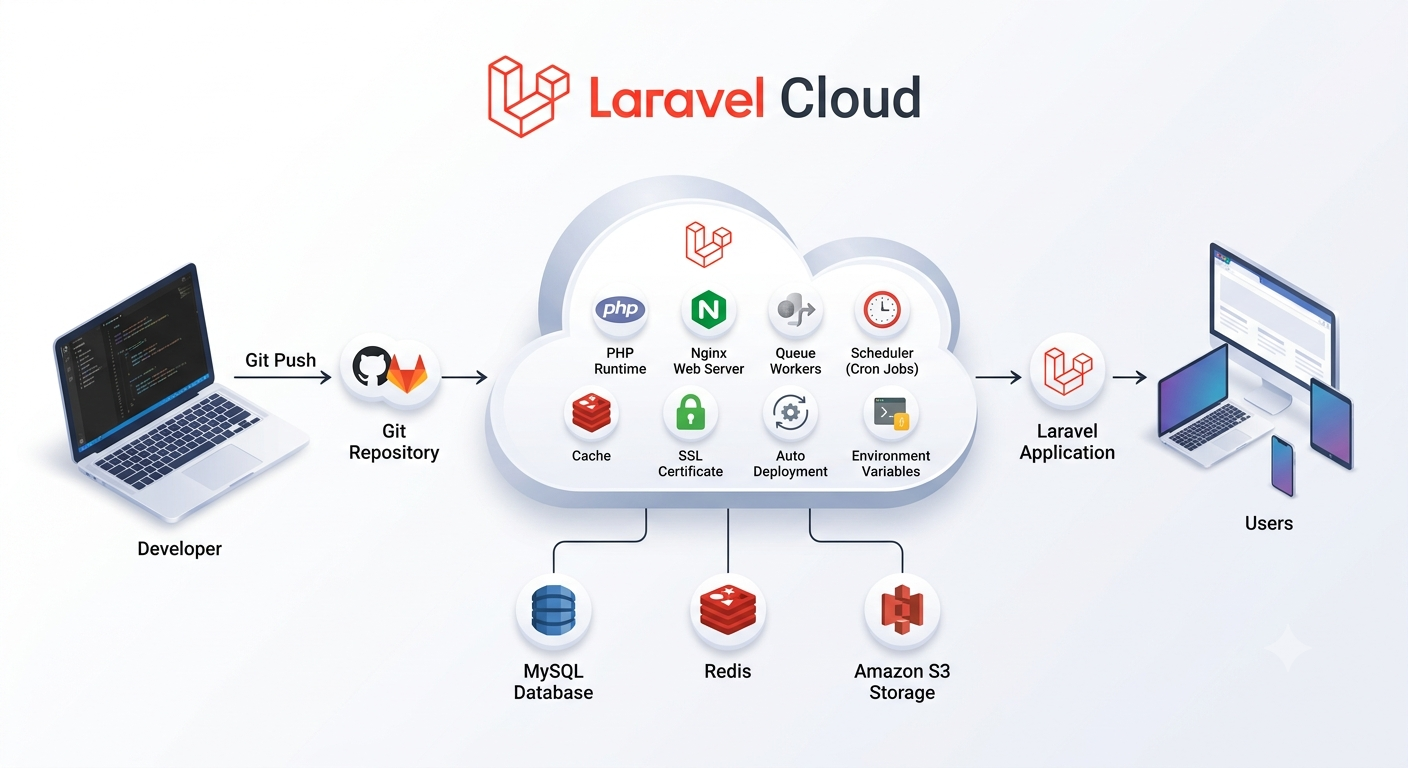
Deploying a Laravel application has traditionally meant provisioning servers, configuring Nginx or Apache, installing PHP and Composer, wrangling SSL certificates, setting up databases, scheduling cron jobs, and keeping all of it patched and running. Cloud providers like AWS EC2 give you flexibility, but that flexibility comes with a real DevOps tax — someone still has to own the infrastructure.
Laravel Cloud removes that tax. It’s a fully managed platform built specifically for Laravel applications, so instead of spending your first afternoon configuring servers, you spend it shipping features. Laravel Cloud handles deployment, security, scaling, monitoring, and maintenance for you.
In this guide, we’ll cover:
- What Laravel Cloud is
- Why it exists
- How the platform works
- The features you get out of the box
- What’s New in Laravel Cloud (2026 Update)
- Laravel Cloud vs. AWS EC2
- When it makes sense to use it
What Is Laravel Cloud?
Laravel Cloud is the official managed hosting platform built by the Laravel team, designed to run production Laravel applications without any manual server work.
Rather than assembling your own infrastructure, Laravel Cloud automates:
- Server provisioning
- PHP and Composer installation
- SSL certificate management
- Database management
- Queue workers
- Scheduled tasks
- Security updates
- Automatic deployments
- Monitoring and scaling
Connect a Git repository, set your environment variables, and deploy. That’s the whole workflow.
Why Use Laravel Cloud?
Infrastructure work eats development time that could go toward the product itself. On traditional hosting, someone has to:
- Spin up virtual servers
- Configure Linux
- Install and update PHP
- Configure Nginx
- Install Composer
- Issue and renew SSL certificates
- Configure firewalls
- Monitor server health
- Apply security patches
Laravel Cloud takes all of that off your plate, so your team can spend its time building features instead of babysitting servers.
How Laravel Cloud Works
The deployment flow is deliberately simple:
Write Laravel Code
        │
        ▼
Push to GitHub
        │
        ▼
Laravel Cloud Detects Changes
        │
        ▼
Build Application
        │
        ▼
Deploy Application
        │
        ▼
Application Goes Live
There’s no SSH session, no manual deploy script, no server to log into. Here’s what that looks like step by step.
Step 1: Create a Laravel Project
If you’re starting fresh, scaffold a new project with Composer:
composer create-project laravel/laravel my-app
Run it locally to confirm everything works before you deploy:
php artisan serve
Step 2: Push Your Project to GitHub
Initialize Git if you haven’t already:
git init
git add .
git commit -m "Initial commit"
Then push it up:
git remote add origin https://github.com/username/my-app.git
git push -u origin main
Your Git repository is what Laravel Cloud deploys from — there’s no separate upload step.
Step 3: Create a Laravel Cloud Project
Once you’re signed in to Laravel Cloud:
- Click New Project
- Connect your GitHub account
- Select your Laravel repository
- Choose the deployment branch (usually
main)
Laravel Cloud automatically detects that it’s a Laravel application and configures itself accordingly.
Step 4: Configure Environment Variables
Just like a local .env file, Laravel Cloud gives you a secure place to set environment variables:
APP_NAME=MyApp
APP_ENV=production
APP_DEBUG=false
DB_CONNECTION=mysql
DB_HOST=database-host
DB_DATABASE=my_database
DB_USERNAME=my_user
DB_PASSWORD=my_password
CACHE_DRIVER=redis
QUEUE_CONNECTION=database
These values are encrypted and never committed to your repository.
Step 5: Create a Managed Database
Skip the manual MySQL install — click Create Database, and Laravel Cloud provisions it and hands you the connection details. If you’d rather use an existing external database, you can connect that instead.
Step 6: Deploy Your Application
Click Deploy, and Laravel Cloud takes care of the rest:
- Installing Composer dependencies
- Building the application
- Optimizing configuration
- Running migrations (if configured)
- Starting the application
Once it finishes, you get a public URL where your application is live.
Automatic Deployments
From here on, deploying is just a git push:
git add .
git commit -m "Added authentication"
git push origin main
Laravel Cloud detects the new commit, pulls the code, installs dependencies, builds, and deploys the update automatically — no server login required.
Built-in Features
Laravel Cloud ships with a set of production-ready features baked in:
SSL Certificates — HTTPS certificates are generated and renewed automatically, with no Let’s Encrypt configuration on your end.
Queue Workers — Background jobs like email sending, notifications, report generation, PDF creation, and image processing run on managed queue workers without extra server setup.
Task Scheduling — Laravel’s scheduler runs without you touching Linux cron. Just define your scheduled tasks as usual:
protected function schedule(Schedule $schedule)
{
    $schedule->command('reports:generate')->daily();
}
Laravel Cloud executes them on schedule automatically.
Automatic Scaling — Compute resources scale with traffic based on your plan, keeping performance steady during spikes.
Monitoring — You get visibility into application health, deployment status, logs, resource usage, and performance, so issues surface quickly.
Security — Automatic SSL, DDoS protection, a Web Application Firewall, security headers, infrastructure patching, automated backups, and dependency vulnerability scanning are all included.
What’s New in Laravel Cloud (2026 Update)
Laravel Cloud just shipped its biggest update since launch: a rebuilt Scale-to-Zero Flex compute tier, a new pricing structure, and enforceable spending limits. Together, they answer the two questions developers ask most about any hosting platform — how fast is it, and what will it cost me.
Scale-to-Zero Flex Compute
Idle Flex apps used to take roughly 10 seconds to wake back up. That’s no longer the case:
- Your entire stack — compute, database, and cache — now sleeps and wakes together as a single unit, about 20x faster than before.
- Wake time is under 500ms, down from ~10 seconds.
- Three sizes are available: 512MB, 1GB, and 2GB.
- Scheduled tasks and queued jobs still run on time — the app wakes briefly to handle the work, then goes back to sleep.
- Enabling it takes no code changes: toggle Scale to Zero on in the environment’s infrastructure canvas, pick a size, and redeploy.
- Pro compute apps stay always-on and aren’t part of this — scale-to-zero is a Flex feature.
Because the app never truly goes offline, users don’t notice the sleep/wake cycle — the first request after a quiet period just resolves a little slower.
MySQL scale-to-zero is coming next, following the same sleep-and-resume pattern already live for the rest of the stack.
New Pricing Tiers
| Plan | Price |
|---|---|
| Starter | $5/month |
| Growth | $20/month |
| Business | $200/month |
| Enterprise | Custom |
Every paid plan now includes $5 in monthly usage credits, drawn from a single pool covering compute, database, cache, storage, bandwidth, queue operations, and custom domains. On the Starter plan, that $5 credit effectively cancels out the $5 price for most small apps — and Starter now includes managed queues, spending limits, and scale-to-zero compute by default.
Spending Limits
You can now set a hard monthly spending cap per organization. Hit the limit, and new resource provisioning stops — requests already in progress keep running, and the cap applies to compute only, so a paused app can come back online quickly once you raise the limit.
Alerts fire at 50%, 75%, and 90% of your limit, so there’s fair warning before anything gets throttled. This sits alongside Laravel Cloud’s existing billing alerts, which notify you but don’t stop spend on their own — alerts keep you informed, limits guarantee you never go over budget.
Laravel Cloud vs. AWS EC2
| Feature | AWS EC2 | Laravel Cloud |
|---|---|---|
| Create Server | Manual | Automatic |
| Install PHP | Manual | Included |
| Configure Nginx | Manual | Included |
| SSL Certificates | Manual | Automatic |
| Deploy Code | Manual | Automatic |
| Security Updates | Manual | Automatic |
| Database Setup | Manual | Managed |
| Queue Workers | Manual | Built-in |
| Scheduler | Manual Cron | Automatic |
| Monitoring | Manual | Built-in |
| Scaling | Manual | Managed, including scale-to-zero |
Advantages of Laravel Cloud
- Faster Deployment — Go from push to live URL in minutes.
- No Server Management — No Linux administration, no infrastructure maintenance.
- Better Security — Updates and platform protection are handled for you.
- Automatic CI/CD — Every push to your deploy branch can trigger a release.
- Cost Control — Scale-to-zero and spending limits mean idle apps cost cents, not a full server bill, and you can’t blow past your budget by accident.
- Developer Productivity — Less time on infrastructure, more time on features.
When Should You Use Laravel Cloud?
Laravel Cloud is a strong fit if you’re:
- Building Laravel applications
- Working at a startup
- Developing SaaS products
- Building enterprise applications
- Running a small team without dedicated DevOps
- Trying to cut infrastructure overhead
If your organization needs deep, custom infrastructure control, a self-managed cloud setup may still be the better fit.
Conclusion
Laravel Cloud strips away most of the operational overhead that comes with traditional server hosting. Automatic deployments, managed databases, built-in security and monitoring, and now scale-to-zero compute with enforceable spending limits — it’s everything you need to run a production Laravel application, without the infrastructure grind and with costs you can actually predict.
Whether you’re shipping a side project, a SaaS product, or a large business application, Laravel Cloud lets you stay focused on the code while it handles the rest.
Final Thoughts
Laravel Cloud is a natural next step for Laravel’s ecosystem — the framework paired with an official, purpose-built hosting platform. The latest update, with sub-500ms scale-to-zero and hard spending caps, makes the cost story clearer than ever. If a streamlined deployment experience, automated security, and less time on server administration sound appealing, Laravel Cloud is worth a serious look.