Introduction
In the fast-paced world of mobile app development, speed and agility are no longer optional — they are essential. Users expect instant bug fixes, rapid feature rollouts, and seamless experiences without interruption. Yet traditional app deployment processes force developers into a frustrating bottleneck: every minor update, hotfix, or UI tweak requires a full app store submission, which can take days or even weeks for review and approval.
This delay creates serious challenges. A critical bug discovered after release cannot be fixed immediately. A typo in production copy sits there for days. Performance improvements wait in queue. Users encounter issues that could have been resolved in minutes, but instead linger for weeks.
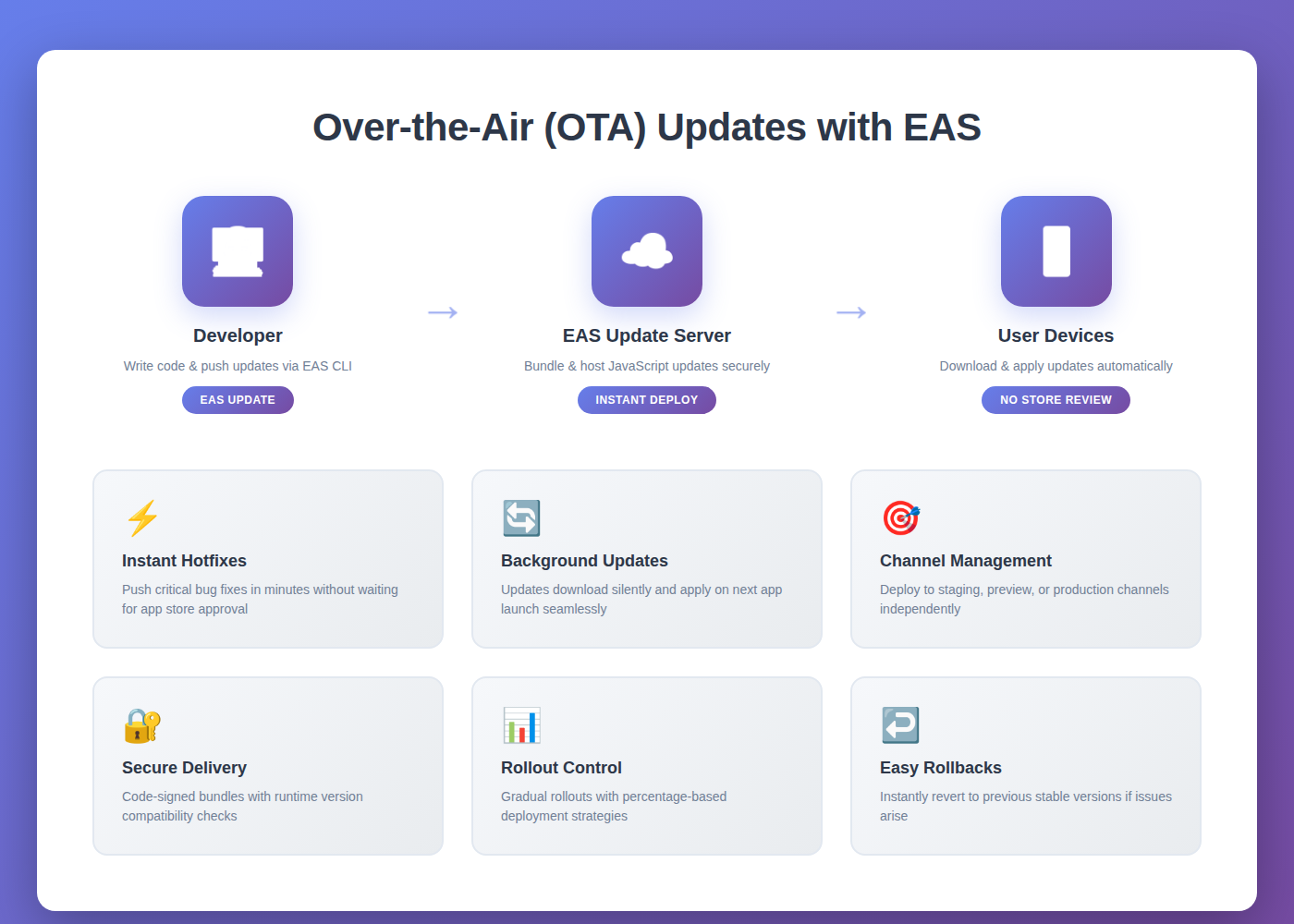
Over-the-Air (OTA) updates through Expo’s EAS Update change this paradigm entirely. With OTA updates, developers can push JavaScript code changes, styling updates, and asset modifications directly to user devices — instantly, securely, and without any app store review process. It is like refreshing a web page, but for your mobile application.
For React Native teams building with Expo, EAS Update represents a transformational shift in how apps are maintained and improved. Let’s explore what OTA updates are, why they matter, and how to implement them effectively in your mobile development workflow.
What Are Over-the-Air Updates?
Over-the-Air updates enable mobile applications to receive new JavaScript bundles, images, configuration files, and other non-native assets directly from a remote server — without requiring users to download a new version from the App Store or Google Play Store.
When a user launches an app that has OTA updates enabled, the app checks with the update server to see if a newer version is available. If an update exists and is compatible with the current native binary, the app downloads the new bundle in the background and applies it on the next app restart or immediately, depending on your configuration.
The critical distinction is this: OTA updates can modify JavaScript logic, UI components, styles, images, and business rules — but they cannot change native code. Any modifications to native modules, permissions, splash screens, app icons, or platform-specific configurations still require a full binary rebuild and app store submission.
Why EAS Update Matters for Modern Development
EAS Update is Expo’s hosted service built on top of the expo-updates library. It provides a complete infrastructure for managing, deploying, and monitoring OTA updates with minimal configuration.
Instant Bug Fixes: Discover a critical bug in production? Push a fix in minutes instead of waiting days for app store approval. Your users receive the corrected version on their next app launch.
Rapid Feature Iteration: Test new features, UI experiments, or business logic changes quickly. Roll out features gradually to subsets of users using channel-based deployments.
Reduced App Store Dependency: Free your development team from the constraints of app store review cycles. Reserve binary submissions for major releases while using OTA for incremental improvements.
Improved User Experience: Users never need to manually update the app for JavaScript changes. The latest improvements arrive automatically, creating a smoother and more reliable experience.
Content and Configuration Updates: Modify API endpoints, feature flags, content strings, remote configurations, and other dynamic elements without touching native code.
How EAS Update Works Under the Hood
Understanding the mechanics of EAS Update helps developers use it more effectively.
Runtime Version Compatibility: Each app binary has a runtime version that represents its native code and configuration state. OTA updates target specific runtime versions, ensuring that only compatible updates are applied to user devices. This prevents crashes caused by mismatched JavaScript and native code.
Channels and Branches: EAS Update uses channels to route updates to different build profiles. For instance, a production channel serves updates to production builds, while a preview channel targets internal testing builds. Branches represent specific update bundles, and multiple channels can point to the same branch.
Background Download and Installation: When users launch the app, it queries the EAS Update server for new updates. If an update is available, it downloads in the background without blocking the UI. The update applies on the next app restart, or immediately if configured to do so.
Rollback Capability: If an update introduces issues, developers can quickly roll back to a previous stable version using the Expo dashboard or CLI commands, minimizing user impact.
Implementation Best Practices
Successfully implementing OTA updates requires following proven patterns and avoiding common pitfalls.
Always Test Updates Before Production: Never push updates directly to production without testing on preview or staging channels first. Use separate channels for internal testing, QA validation, and production releases.
Manage Runtime Versions Carefully: Choose a runtime version strategy that matches your development workflow. The fingerprint policy automatically calculates compatibility, while manual strategies give precise control. Ensure that updates only target compatible binaries.
Monitor Update Adoption: Use the Expo dashboard to track how many users have received each update. This visibility helps identify deployment issues and ensures updates reach the intended audience.
Implement Gradual Rollouts: For critical updates, use percentage-based rollouts to deploy changes to a small subset of users first. Monitor crash rates and performance metrics before expanding the rollout.
Clear Update Messages: Always include descriptive commit messages when publishing updates. These messages appear in the Expo dashboard and help your team understand what changed and when.
Handle Update Checks Gracefully: Configure whether updates check on app launch, in the background, or manually. For mission-critical apps, implement custom update logic using the expo-updates API to control exactly when updates apply.
Common Use Cases for OTA Updates
OTA updates excel in specific scenarios where speed and flexibility are paramount.
Hotfixes and Critical Patches: When a production bug affects user experience or business logic, OTA updates provide the fastest path to resolution. Push the fix within minutes and reach users on their next app launch.
A/B Testing and Feature Flags: Deploy different versions of features to different user segments using channel routing. Test UI variations, onboarding flows, or business logic changes without separate binaries.
Content and Copy Updates: Modify user-facing text, marketing messages, help documentation, or promotional content instantly. No need for binary releases when only content changes.
Performance Optimizations: Improve rendering logic, optimize bundle sizes, refactor components, or enhance animations — all deployable through OTA.
API Endpoint Updates: Switch backend environments, update GraphQL schemas, modify authentication flows, or change third-party integrations without forcing users to download new binaries.
Limitations and Considerations
While OTA updates are powerful, they have important constraints that developers must understand.
Native Code Changes Require New Builds: Any modification to native modules, dependencies, permissions, build configurations, or platform-specific code requires a full binary rebuild and app store submission. OTA updates only affect JavaScript and assets.
Runtime Version Compatibility: Updates must match the runtime version of the installed binary. Pushing an incompatible update results in users not receiving it. Maintain strict version management to avoid deployment issues.
Network Dependency: Users need an internet connection to receive updates. Apps designed for offline-first scenarios should handle update failures gracefully and continue functioning with the existing bundle.
Security Considerations: OTA updates bypass app store review processes, placing greater responsibility on development teams to ensure code quality and security. Implement robust testing, code review, and monitoring practices.
Conclusion
Over-the-Air updates with EAS represent a fundamental shift in how modern mobile applications are deployed and maintained. By decoupling JavaScript updates from native binary releases, development teams gain unprecedented speed, flexibility, and control over their deployment pipelines.
For React Native developers using Expo, EAS Update eliminates the painful wait times associated with app store reviews, enables instant bug fixes, and supports rapid iteration cycles that were previously impossible in mobile development. It brings web-like deployment agility to the mobile world.
The key to success with OTA updates lies in understanding their capabilities and limitations, implementing them thoughtfully with proper testing and rollout strategies, and maintaining strict runtime version compatibility. Teams that adopt OTA updates early in their development process build habits around versioning, channel management, and staged deployments that pay dividends throughout the application lifecycle.
Whether you are building consumer apps that need rapid feature iteration, enterprise tools that require immediate hotfixes, or mission-critical systems where reliability is paramount, OTA updates with EAS provide the infrastructure to ship better software faster.
Embrace OTA updates as a core part of your deployment strategy, and your team will spend less time waiting for app store approvals and more time building features that matter to your users.